
Modern web development sometimes depends on third-party code. On the front-end, that’s commonly via the package registry npm. You cannot directly download dependencies from npm on CodePen, but we do help use them.
Basic Usage
Imagine the venerable uuid package on npm. Using it is very simple and their own docs show off many examples of this.
import { v4 } from 'uuid';
v4();Code language: JavaScript (javascript)
The 'uuid' bit above is what the web platform calls a “bare module name” or a “bare module specifier”. On projects that use Node.js, this typically means installing this package and a bundler finding it within a node_modules folder. But CodePen does it a bit differently.
Bare module specifiers are also part of how import maps work, and CodePen takes advantage of that. In the example code above, the CodePen Compiler will see that bare module specifier scaffold a package.json file for you with the latest version of that package in it.

This package.json file will automatically be inserted into all .html files for you in the Build Output.

So you don’t need to worry about manually using import maps yourself, CodePen handles it for you. You can include your own import maps, and CodePen will respect those by combining the automatically generated import map with your import map, honoring your choices first.
Potential Package Version Issues
Package interdependencies can be complicated!
Here’s an example of some dependencies in a package.json file.
{
  "dependencies": {
    "liquid-glass-react": "1.1.1",
    "react": "19.1.0",
    "react-dom": "19.1.0"
  }
}Code language: JSON / JSON with Comments (json)
For whatever reason, react-liquid-glass doesn’t work with React 19.1.0, and must be updated to 19.1.1. Thankfully, have the control to do that with your own package.json file (just update the numbers!).
{
  "dependencies": {
    "liquid-glass-react": "1.1.1",
    "react": "19.1.1",
    "react-dom": "19.1.1"
  }
}Code language: JSON / JSON with Comments (json)
In a similar vein, sometimes packages have their own dependencies that don’t match with what you’ve specified. The CDN we map to, esm.sh, allows you to specify versions of the dependencies of other packages (their docs). So the above issue could have also been solved like this:
{
  "dependencies": {
    "liquid-glass-react": "1.1.1?deps=react@19.1.0,react-dom@19.1.0",
    "react": "19.1.0",
    "react-dom": "19.1.0"
  }
}Code language: JSON / JSON with Comments (json)
But the above is non-standard package.json behavior, it just happens to work with the way CodePen compiler produces import maps. A standard-behavior way would be to include your own import map with the override:
<script type="importmap">
{
  "imports": {
    "react": "https://esm.sh/liquid-glass-react@1.1.1?deps=react@19.1.0,react-dom@19.1.0"
  }
}
</script>Code language: HTML, XML (xml)
Your import map will override CodePen-injected import maps, so this would fix the issue.
Resetting Package Versions
If you simply delete the package.json file, it will be re-generated with the most recent version on npm of all the packages found and used. This can fix issues that can come up with package versions.
Package Search

Package Search is within the Assets Modal. To open it, you’ve got choices:
- Click the in the sidebar
- Run the “Open Package Search” command in the Omnibar
Inside the Assets Modal is a tab for Packages, where you can search for packages and libraries.
The Packages Search is a live index of everything on npm, powered by the jsDeliver API. In the search results, we offer copy-and-pastable code for you to use that package.
- We’ll always offer the
<script>source URL. - If the package is ESM compatible, we’ll offer the
importcode. - If the package includes CSS, we’ll offer a
<link>for HTML or@importfor CSS to use the main stylesheet.
Using CDNs Directly
Package search, by default, suggets using the bare module specifier which will make your npm packages work via the import maps feature shown above. But you’re free to link to assets anywhere, including CDNs built for doing this, if you wish.
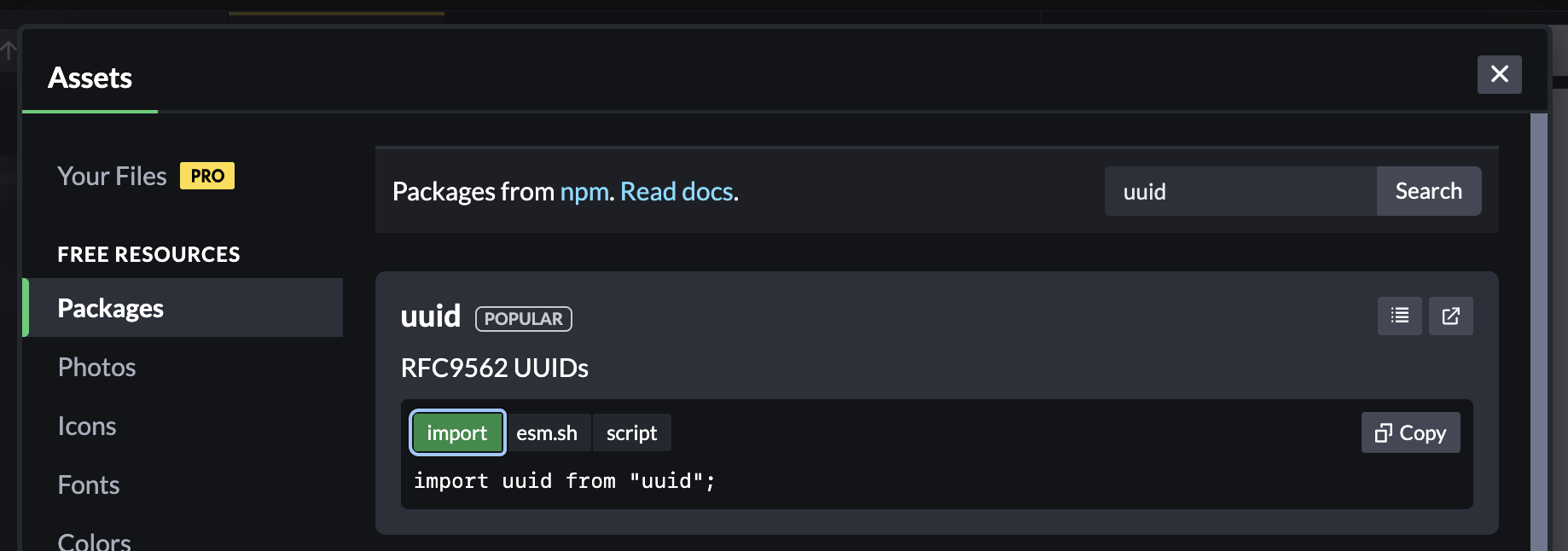
The search results area offers a couple of copy and paste options for you.
/* CodePen will make work via Import Maps */
import React from "react";

/* Use package from esm.sh */
import uuid from "https://esm.sh/uuid@11.1.0";

/* Use as script via jsDelivr */
<script src="https://cdn.jsdelivr.net/npm/uuid@11.1.0/dist/cjs-browser/index.min.js"></script>Code language: JavaScript (javascript)
If the package happens to have a main CSS file, that will be offered as well. For example, searching for “reset” is likely to turn up Eric Meyer’s reset CSS and be available under a CSS tab in a format that CSS files can use like:
@import "https://cdn.jsdelivr.net/npm/reset-css@5.0.2/reset.min.css";Code language: CSS (css)There are others out there like UNPKG and CDNjs.