
Any 2.0 Editor Pen can become a live website on the internet! CodePen makes it extremely fast and easy: just the click of a button.
How Deployment Works
Deploying

To deploy a Pen, open the Deploy Panel and click the Deploy button. Your Pen will be deployed instantly to a random subdomain.
Redeployment
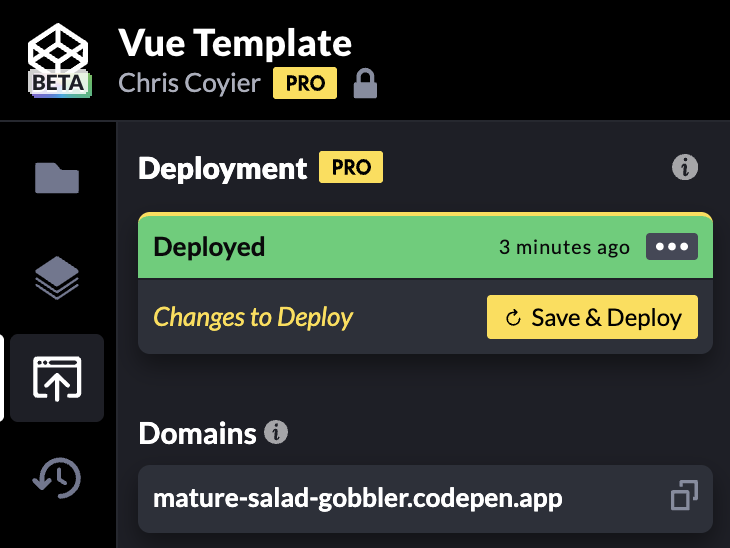
As you work on a Pen, new saves are not automatically deployed to the live website unless you specifically enable the Deploy on Save option. If you leave it off, you can work on things as you please over time without worrying that every change goes live immediately.
To push changes to the live website, open the Deploy Panel and click the Save & Deploy button.
If you want all changes to go live on the website immediately after saving, open the  menu and enable the Deploy on Save option.
Undeploying
You can pull down your site at any time by opening the Deploy Panel and clicking Undeploy. Anyone visiting that URL will see a 404 page.
Changing the Subdomain
The given subdomain will remain constant as long as the Pen is deployed. If you undeploy and redeploy, you will automatically be given a new subdomain. You cannot get back an older subdomain you used before. Any links to the old subdomain will no longer work, so be aware!
Differences Between the Pen Preview and the Deployed Pen
- The Pen Preview includes some CodePen-injected code to power the console and Live View. Your deployed Pen will not.
- The Pen Preview isn’t available to anonymous users. Deployed Pens are.
- A deployed Pen can have a custom domain.
Custom Domains
Deployed Pens can be served by any other domain name that you own. CodePen doesn’t sell domains or help you buy domains. You can buy domains from lots of domain provider companies, like GoDaddy or Porkbun.
After you own the domain, you’ll have access to change the DNS settings, which you’ll need to update to make CodePen hosting work. These are usually editable under ‘DNS’ or ‘DNS Settings’ in your provider’s domain settings. The following are specific instructions for the more common domain providers.
- Cloudflare
- GoDaddy
- Porkbun
- Hover
- BlueHost
- Namecheap
- Network Solutions
- Amazon Route 53
- Google Cloud DNS
- Azure DNS
If your provider isn’t on the list above, or you’re still unsure how to update your DNS records, contact your domain provider for assistance.
To be extra clear: when we mention changing your DNS settings, that doesn’t happen on CodePen itself; it happens in the settings area of the service you manage the domain from (or where you manage the DNS for that domain).
Subdomains
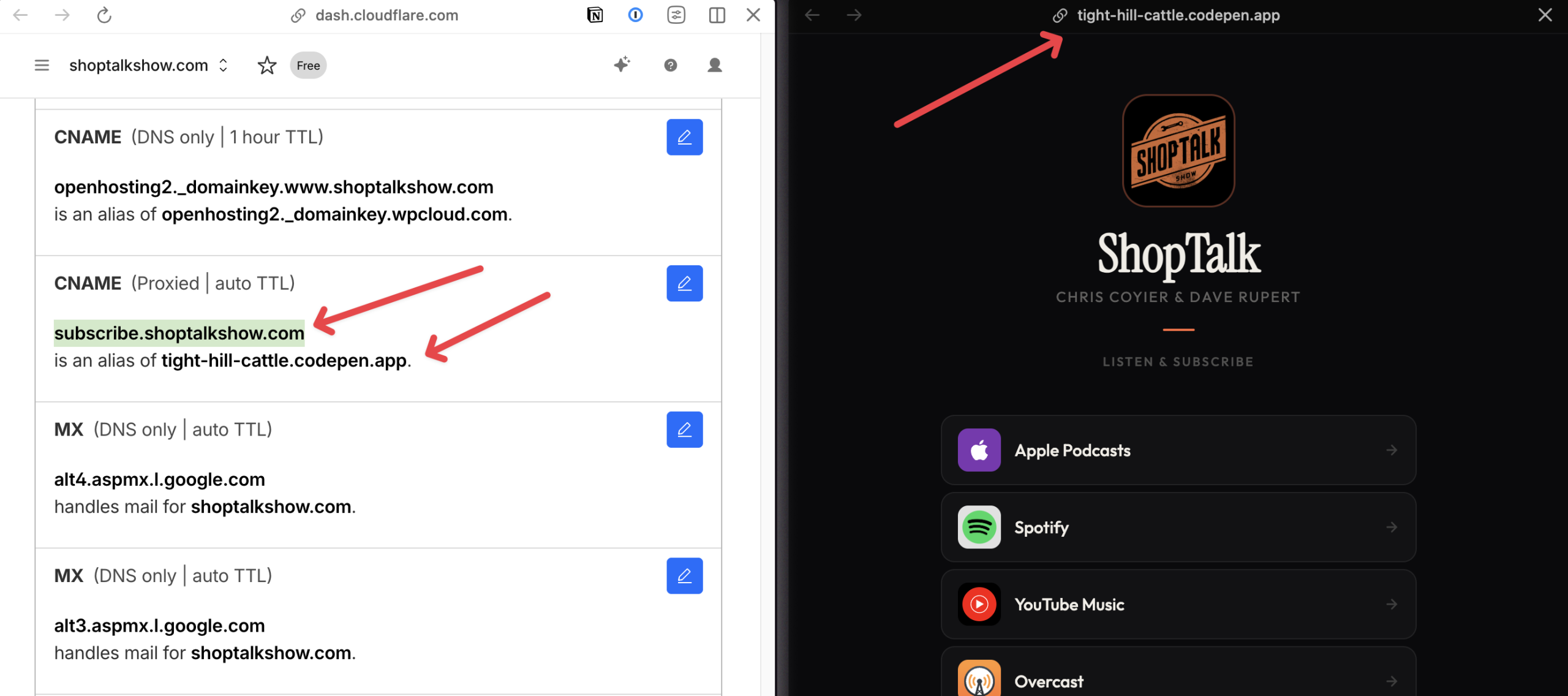
Subdomains (like subscribe.shoptalkshow.com) are an easy way to host a website on a domain you already own. In fact, just www.website.com is considered a subdomain. To use a subdomain, you update your DNS settings with a CNAME record that points to the URL of your deployed site
| Record Type | Host | Value |
|---|---|---|
| CNAME | subdomain | {codepen-provided-subdomain}.codepen.app |
Here you can see an example Cloudflare DNS dashboard and the CodePen-deployed site being set up to work.
Apex Domains
Apex domains (e.g., “root” or “top-level” domains) are like codepen.io with no subdomain in use.
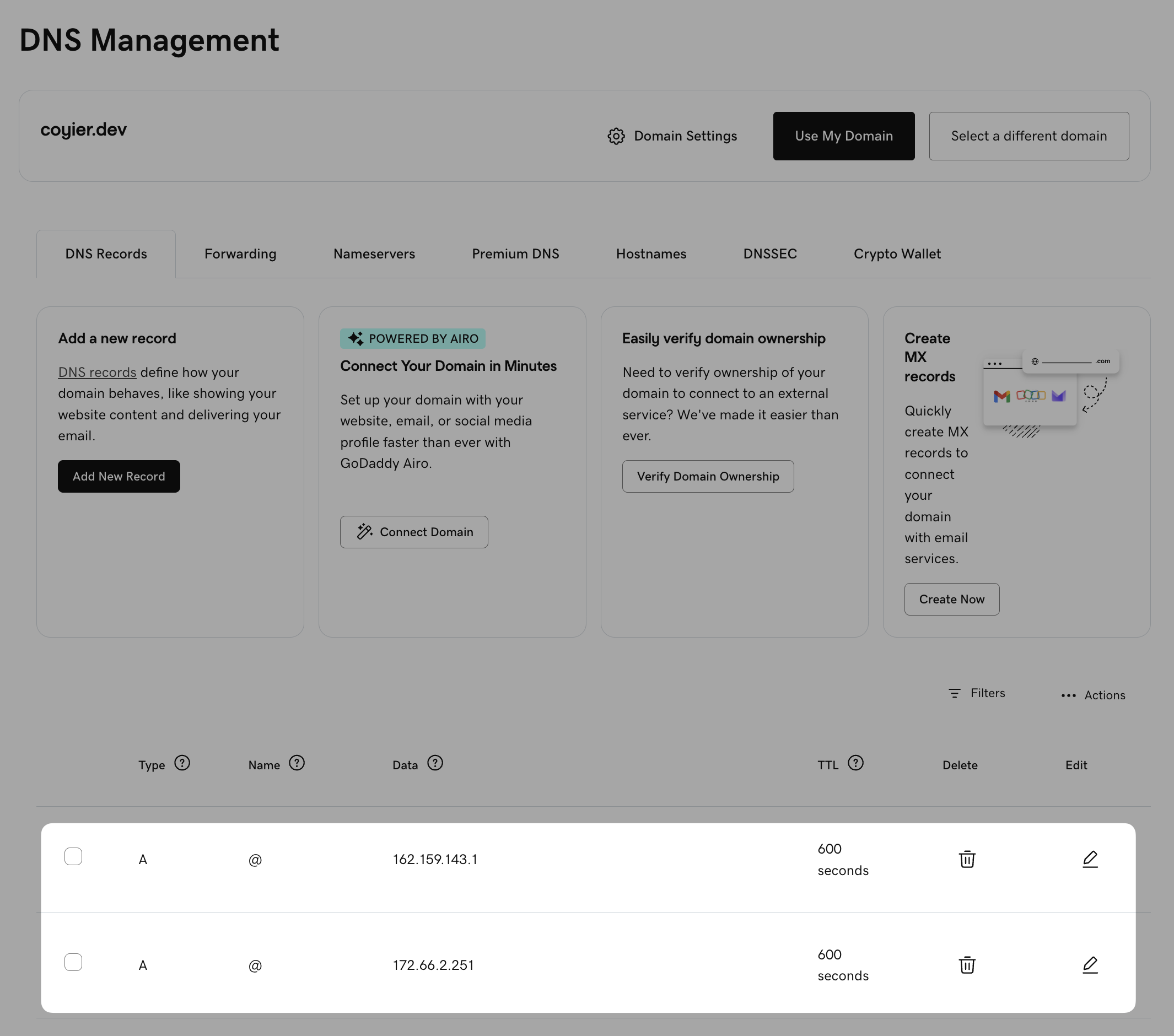
The easiest way to use your custom apex domain is via A records. Update your DNS settings with A records that point to these two CodePen IP addresses:
| Record Type | Host | Value |
|---|---|---|
| A | @ | 162.159.143.1 |
| A | @ | 172.66.2.251 |
That looks like this:
As an alternative, you might also be able to use a CNAME record. This works with DNS providers like Cloudflare which support CNAME flattening, which means you can point an apex domain directly at a URL instead of an IP address.
| Record Type | Host | Value |
|---|---|---|
| CNAME | @ | {codepen-provided-subdomain}.codepen.app |
That looks like this:

CNAME records may work slightly differently depending on the DNS provider. For the record, they usually don’t work for apex domains, but some DNS providers help make them work. For instance, on dnsimple it works by using a wildcard subdomain like this:

You might also be able to get it to work using ALIAS records, which exist to address the issue of CNAME not working for apex domains, but your mileage will vary (we’ve yet to see it work properly). Same deal with ANAME records.
Video
Limitations
- Pen Deployment is only a PRO feature
- Deployed Pens are limited to 1TB of bandwidth per month each. CodePen does not charge for overages, but sites beyond that limit may be undeployed.
Downgrading
If you downgrade to a free plan on CodePen or delete your account, all your sites will be undeployed. If you upgrade again, you can deploy them again.