CodePen supports WebMCP in the editor, an up-and-coming web standard for AI agents to communicate with and control websites.
More about WebMCP
The main repo for the concept also explains it clearly:
WebMCP lets developers expose web application functionality as “tools”—JavaScript functions with natural language descriptions and structured schemas, designed for AI agent ingestion. These tools can be invoked by AI agents, including those built into the browser.
You might think: AI agents can already control websites without this. That’s true, but it’s awkward and expensive. They essentially have to poke around the website like they are seeing it for the first time, every time. They explore the DOM and may even take screenshots to find things like a button that needs to be pressed. That’s slow and quite token-usage heavy.
With WebMCP, you expose tools that AI agents can see and understand exactly what they do and what data they take and return, so they can use them quickly and efficiently. Yoav Weiss calls WebMCP “Agentic WebPerf” and likes how it allows for both you and the agent to work together on the web:
Co-browsing is the only model where the developer and the user maintain control over the experience, and the user can take over from the agent at any point. It’s the only model where the web remains the web.
Why use WebMCP?
Perhaps the most compelling reason is that you get to “bring your own AI”. Maybe you already have an AI subscription that you like working with. That AI agent can communicate with CodePen and use CodePen efficiently this way, including helping you code directly.
You also may be able to use and communicate with CodePen in your native language.
How to Use WebMCP on CodePen
We’ll explain in more detail how to use each of these in their own sections below:
The Official ChatGPT App
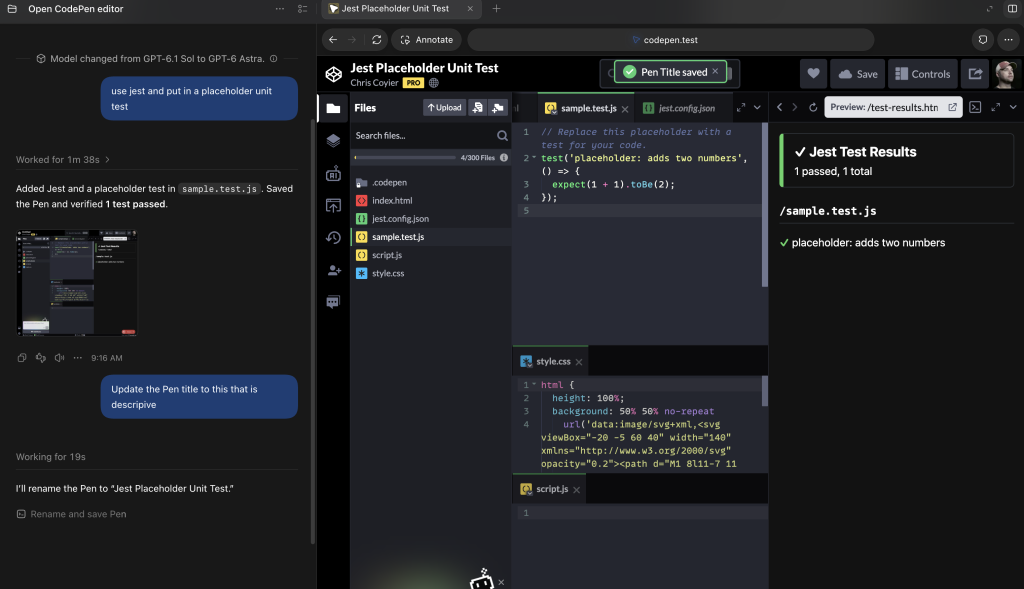
The native ChatGPT app for desktop has an in-app browser that supports WebMCP. To use CodePen with ChatGPT, go to a website in its in-app browser. It should automatically recognize the WebMCP tools the website exposes, so you can use them when you ask for things in plain language.
Here’s a video showing off how it works:

Bring-Your-Own-Agent + agent-browser CLI tool
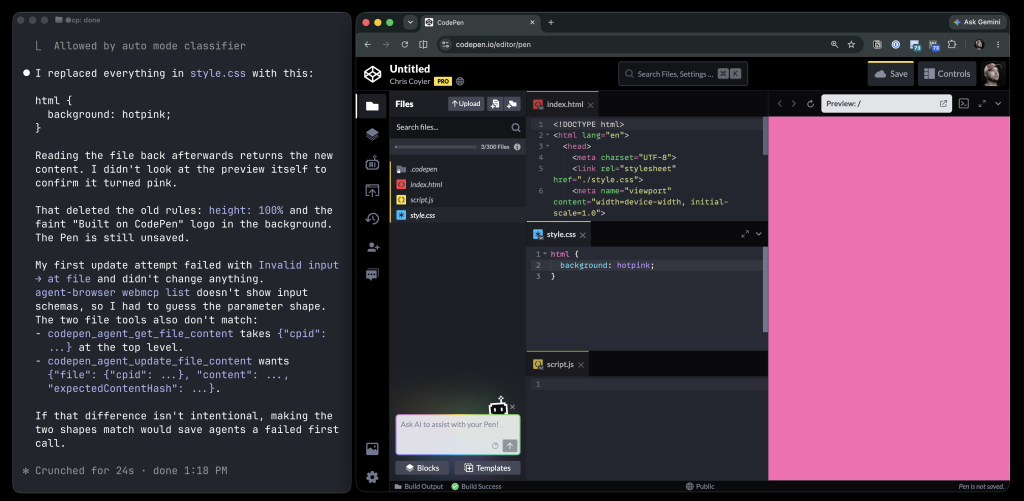
Vercel Labs has a CLI tool called agent-browser that means you can control a browser through terminal commands. It supports WebMCP by default, so it’s especially good at controlling pages that expose tools, like the CodePen editor.
If you have agent-browser installed, you can use any local AI agent (like Claude Code, Codex, Open Code, Pi, etc.) to do anything CodePen can do using normal plain language.
Here’s a video showing how it works:
The Google Chrome Extension
When Google announced their work on WebMCP, they also released a Chrome Extension for working with it. It’s pretty advanced: you have to build the extension from source, then load it using Chrome Extensions’ “Load unpacked” feature. Then you either need to select the option to use a “Local Model”, or you’ll have to run the API server, which will need an API key for an AI service and such to work. It’s a lot of steps, the experience isn’t amazing, and it’s a bit slow, but it does do the job.
Here’s a video showing it working:

Examples
Here are some things you could try!
Add a Jest test to this Pen and put in some placeholder unit tests.
Scaffold out this Pen idea I have. It can use GSAP. Use as many files as it needs to make clean code. I’d like to have a vertical row of “daughters”. Placeholder illustrations or simple SVG’s should do. You should be able to drag them. If you drag them onto a box that says “Analyze Daughter with AI” it will pretend it’s thinking about it. Then it will answer by typing out “this daughter is empathetic, creative and an animal lover”. It answers the same no matter which daughter you drag on there. The daughter will snap back into it’s original place after.
Deploy this Pen
Update the Title, Description, and Tags of the Pen to approprite things based on this chat we’ve been having.
Use Svelte, Tailwind, and TypeScript to build a calendar UI
Look at the runtime errors in the console for this Pen and see if you can fix the error.
The Future
WebMCP is cutting-edge technology, so it’s generally not built into stable web browsers yet. Chrome does have a feature flag for flipping on testing:
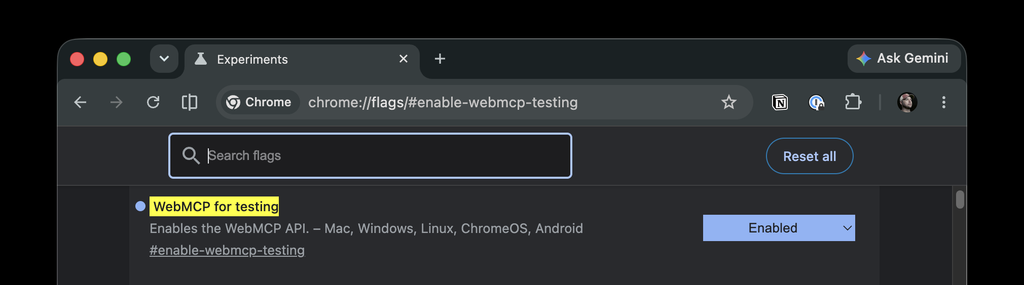
But even with that flag turned on (which should start exposing things like document.modelContext and navigator.modelContextTesting) there still needs to be a bridge between the agent and the page, so the in-browser Gemini agent right there in Chrome is unlikely to immediately work.
Hopefully the future is that all browsers bake this in and it’ll be trivially easy for AI agents to use the tools that WebMCP provides.