The other week when I was talking about Web Components in the Corner, I mentioned zero-md, a nice little Web Component for doing exactly that. I had to bite my tongue a little bit though, as the 2.0 public beta hadn’t quite made it out of the door yet.
See, the new compiler, among its many powers, has a cool trick up its sleeve we call Inline Block Processing. When you’re in any HTML-ish language, you’ve got the lang attribute you can put on elements. Our compiler sees those, and if the language matches a file extension that we currently support via Blocks, we’ll process the content of that element with that block.
Meaning you could write HTML like this:
<p>Blah blah just hanging out.</p>
<div lang="md">
  - I'm a list
  - in Markdown format
  - cool, right?
</div>
<style lang="scss">
  $listColor: red;
  ul {
    color: $listColor;
  }
</style>Code language: HTML, XML (xml)
And that will… work. As you might be able to guess, it does. In the final processed code, the lang attributes are removed and the guts of those elements are replaced with the processed code produced by the relevant Block.
It’s just a neat little ability! In the case of Markdown, it’s especially useful, and means you don’t need to reach for a client-side tool like zero-md, because the processing happens server-side, which is good for performance.
Avoiding tools, or downshifting tools from client to server, always has a nice feeling to me.
Blake Watson has a presentation-article No build tool? No problem! that has nice basic explanations of the tradeoffs. Like, is TypeScript useful? Of course it can be. Does it mean complicating your workflow? Yep. Now you’ve got a whole chain of dependencies to potentially worry about, and the potential for things to break, especially over time. It doesn’t mean don’t use it, but it’s worth thinking about, especially when there are interesting alternatives. JSDoc is the obvious one, but Blake points out you can just put // @ts-check on the top of files and VS Code will TypeScript check a regular JavaScript file, which is pretty interesting. I’d hope CodePen makes choosing tools a bit more palatable as well, since there is no setup cost and it won’t break over time, as the tool choices are locked in forever until you change them.
While considering build tools a bit, it feels like an interesting time to consider if AI could be (replace?) a build tool. Here’s an example. RIGHT THIS SECOND can you remember how to write a loop in Sass code? Or is it something you gotta look up? If you’re like me, I always try to find a reference to look at (often times Pens of my own I know I have sitting around).
But with AI, you can kinda just… fake it. Like type out what you think it might be just let it convert it. It’ll probably be right. Here’s an example:
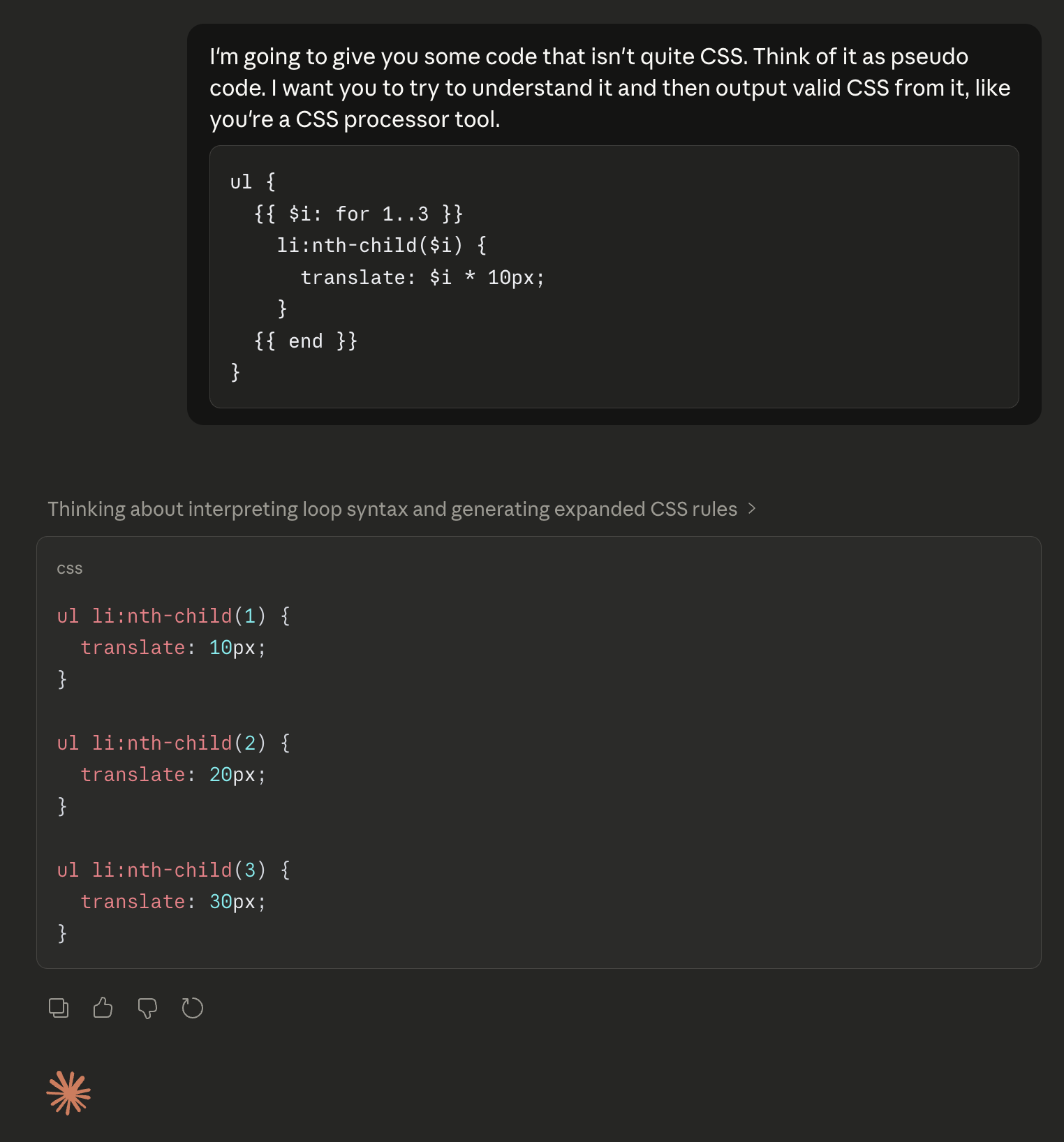
You can’t leave that pseudo code in your codebase, of course, as AI conversion like this is non-deterministic and it would be a ridiculous waste of resources to convert it on every build, but it’s kinda interesting for one-time conversion.
In that same vein… could AI be your CMS? That silly thought passed through my mind the other day and I learned it’s already had quite a debate that I missed. So I blogged that. The gist is that, yes, it actually can be quite useful to not have your content in a CMS and have it right in your codebase instead, and potentially for LLM-related reasons. I quibbled with saying “CMS” though, as I think if your content is Markdown-and-Frontmatter and something is processing that with templates into HTML output… that already is a CMS. It’s the database part that is most relevant to this conversation.
Whether you or I like it or not, giving LLM tools access and context is where things seem to be headed.